Modbus Vault
A real-time ESP-IDF firmware project that bridges Modbus telemetry to MQTT with deterministic execution, offline buffering, and replay support.
The system is designed around clean separation of concerns, bounded RTOS work, and resilient telemetry delivery.
Overview
Modbus Vault collects frames from Modbus devices, serializes them into compact payloads, and routes them to either MQTT or flash-backed storage depending on connectivity. When the network returns, stored data is replayed automatically.
Why This Project Exists
Industrial telemetry systems often need to keep running during network outages.
This project focuses on:
- predictable execution under load
- offline-first telemetry handling
- controlled replay after reconnection
- clear firmware/hardware co-design
Key features
- Deterministic RTOS design with bounded work per activation
- Event-driven architecture with queues and task notifications
- Offline buffering with flash-backed circular storage
- Replay support for stored telemetry
- Custom slab allocator to reduce heap fragmentation
- CRC-validated persistent storage
- Modular ESP-IDF component structure
Software Architecture
The firmware is split into four main layers:
- Telemetry Pipeline
Parses Modbus frames and serializes them for transport. - Router
Makes a fast online/offline decision and forwards payloads to the correct service. - Telemetry Service
Publishes live and replayed telemetry over MQTT. - Logger Service
Stores telemetry during outages and feeds replay data in bounded batches.
This design separates the control plane from the data path and keeps runtime behavior predictable.
Project Structure
components/-> core firmware modulesmain/-> application entry pointtools/-> Python tooling for telemetry and logstest_modbus_vault/-> Unity-based testsdocs/-> diagrams and generated documentation
Example Output
System Diagram
Data Flow
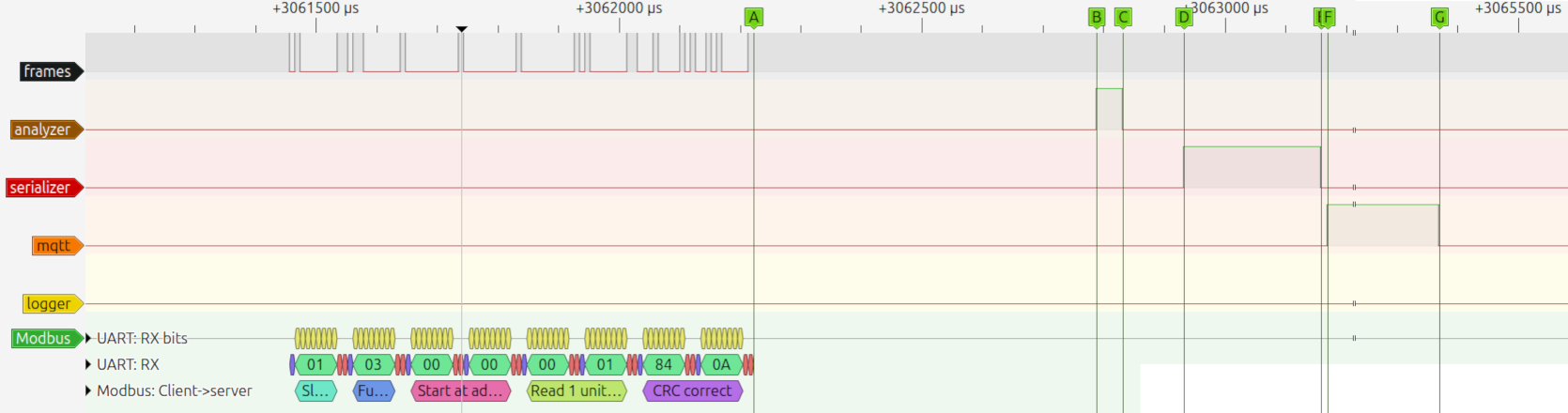
Online (Live Telemetry)
 |
|---|
| Online Path PulseView capture |
| Interval | Time (us) | Description |
|---|---|---|
| A:B | ~565 | End of UART frame to start of frame slicing |
| B:C | ~44 | Analyzer task time |
| C:D | ~100 | CRC check to serializer queue |
| D:E | ~226 | telemetry_pipeline (Serializer) task time |
| E:F | ~10 | Routing callback |
| F:G | ~2200 | telemetry_service (MQTT publishing) task time |
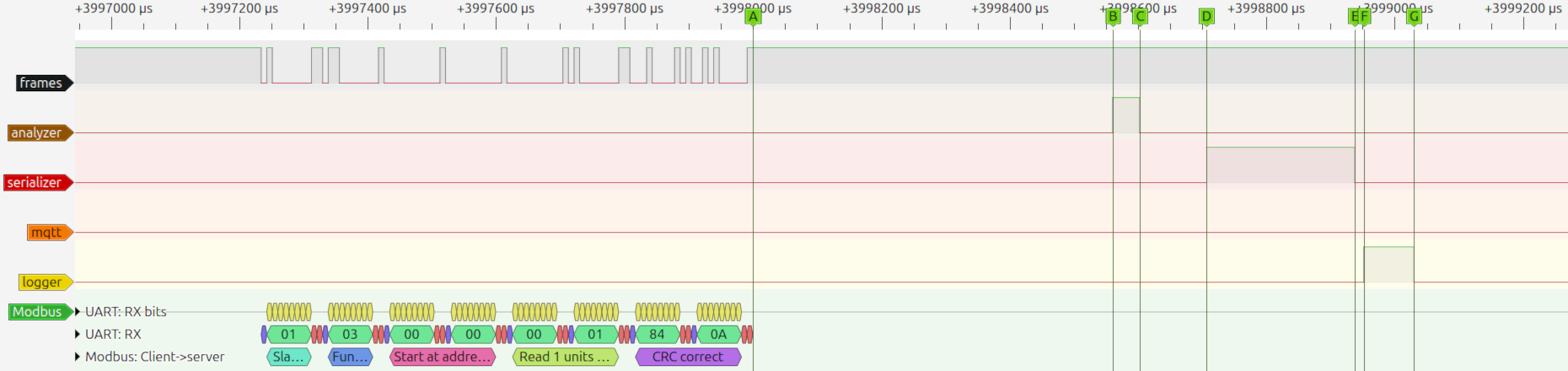
Offline (Buffering)
 |
|---|
| Offline Path PulseView capture |
| Interval | Time (us) | Description |
|---|---|---|
| A:B | ~561 | End of UART frame to start of frame slicing |
| B:C | ~42 | Analyzer task time |
| C:D | ~104 | CRC check to serializer queue |
| D:E | ~231 | telemetry_pipeline (Serializer) task time |
| E:F | ~14 | Routing callback |
| F:G | ~78 | logger_service "Entry logging" task time |
Replay
Real-Time Design
The system is designed for deterministic execution in an RTOS environment:
- Tasks process a bounded number of items per activation
- No task drains queues completely (prevents CPU starvation)
- Replay is executed in quota-limited batches
- Work is event-driven using queues and task notifications
- Flash operations are isolated from time-critical paths
This ensures predictable behavior even under:
- High telemetry rates
- Network outages
- Replay recovery scenarios
Task Model
Each service runs as a dedicated FreeRTOS task:
| Task | Responsibility |
|---|---|
| Telemetry Pipeline | Serialization |
| Telemetry Service | MQTT publishing (live + replay) |
| Logger Service | Flash persistence and replay feeding |
| System Controller | Application Lifecycle |
Scheduling Principles
- Foreground work
- Live publish
- Offline logging
- Background work
- Replay of stored data
Foreground tasks always take priority over background recovery.
Task Interaction & Queues
The system uses dedicated queues and event-driven tasks to ensure deterministic execution and clear ownership of responsibilities.
Notes
- Each queue has a single consumer, ensuring deterministic behavior
- Tasks are event-driven and activated via queue + notification coupling
- Telemetry Service prioritizes live data over replay data
- Logger Service handles both persistence and replay generation through Blackbox Logger
- Replay is fed in bounded batches to prevent system overload
System Interactions
Configuration & Persistence
- The system utilizes a custom NVS Manager to abstract flash operations and ensure data integrity
- Flush Policy: Changes are buffered in RAM and flushed to flash every 30 seconds to minimize flash wear. Configurable in
components/nvs_manager/private_include/nvs_manager_internal.h - Integrity: All stored blobs are protected by a Modbus-compatible CRC16. Corrupted data results in an automatic fallback to default or shadow configurations.
- State Recovery: Persistent storage includes WiFi credentials, MQTT configurations and Blackbox Logger parameters.
- Flush Policy: Changes are buffered in RAM and flushed to flash every 30 seconds to minimize flash wear. Configurable in
- Blackbox Logger circular storage preserves buffered telemetry across reboots.
Serialization Notes
The project uses Protocol Buffers for compact binary log serialization.
Field numbering is treated as stable to preserve backward compatibility with previously captured logs. Future schema evolution should use additive changes where possible and reserve deprecated field IDs.
Security & Network Provisioning
Unified Provisioning Flow (BLE)
On clean installations, or when NVS values return empty string sentinels, the firmware boots into provisioning mode:
- Uses ESP-IDF's network_provisioning and protocomm components over Bluetooth Low Energy.
- Uses protocomm sec1 to exchange credentials without plaintext exposure.
- Once the client app commits valid network configurations, save the state, updates NVS, and executes an automated system reboot
esp_restart().
Espressif's Android app "com.espressif.provble" was used during development & testing.
Protocomm Schemas Choice
During the architectural design phase, both Security 1 and Security 2 schemes were evaluated:
- Security 2 (SRP6a): While it is the most secure choice, it requires off-chip pre-calculation of a unique salt/verifier. This architecture was deferred to keep the development scope focused on core real-time telemetry pipelines.
- Security 1 (Curve25519 + AES-CTR): Selected as the optimal choice for this deployment. It utilizes an X25519 key exchange to establish a secure session key over the air, combined with a Proof of Possession (PoP) string as a pre-shared secret for authentication.
MQTT Credential Provisioning
MQTT mTLS credentials are handled separately from standard variable structures to prevent heap fragmentation and safely managed inside a custom certs partition:
- Memory-Mapped: High-speed, read-only mapping directly via MMU
esp_partition_mmap. - Certificates/key Partition Layout:
- Certificates/Key (payload) are serialized, each null-terminated to be parsed correctly by MQTT stack as standard string.
- Serialized payload are encased between a header and a Modbus CRC16. CRC is calculated across the entire block (padded-header + payload + alignment-padding) for data integrity.
- Header is padded to 32 Bytes and the whole structure is padded to 32 Bytes to satisfy Flash encryption requirement.
- Since MMU requires 64KB addressable memory (pages) the partition start offset must be aligned to 64KB.
| magic | client certificate | client key | CA | padding | |||
|---|---|---|---|---|---|---|---|
| offset | len | offset | len | offset | len | ||
| 32-bits | 32-bits | 32-bits | 32-bits | 32-bits | 32-bits | 32-bits | 32-bits |
| 32 Bytes | |||||||
| padded-header | client-certificate | client-key | CA-certificate | padding | modbus-crc-16 | ||
|---|---|---|---|---|---|---|---|
| 32 Bytes | data | data | data | 0 to 31 Bytes | 2 Bytes | ||
| (Nul-terminated) | (Nul-terminated) | (Nul-terminated) | 32B Aligned | ||||
| Multiple Of 32 Bytes | |||||||
*openssl was used to generate certificates/keys for testing*
Certificates/Key Provisioning
A python script tools/scripts/provisionDevice.py was developed to pack them into a binary and uses esptool to flash the binary depending on flags:
- Development Mode
--mode plain: Pass unencrypted data directly. - Production Mode
--mode device-encrypted: Pass unencrypted data to esptool that uses the configured pre-fused chip HW to encrypt data to flash. - Host-Side Mode
--mode host-encrypted: Uses a local key and espsecure to pre-encrypt data before sending it.
Provisioning Security Configuration
By default, this repository builds with an unencrypted, insecure configuration so it runs out-of-the-box on standard hardware. To enable BLE Provisioning and MQTT over mTLS, you will need to enable these features manually via the ESP-IDF configuration menu.
Open the Configuration Menu
Run project configuration:
Configure BLE Provisioning
- Navigate to Modbus Vault Settings -> Select Network Configuration.
- Under Wi-Fi Credential Source Mode, select BLE Provisioning.
- Navigate to Component config -> Protocomm.
- Ensure that Security 1 is checked.
- [Optional] Choose NimBLE stack. As it is lighter and has smaller footprint.
Configure MQTT Over MTLS
- Navigate to Modbus Vault Settings -> MQTT Client Configuration.
- Ensure Enable mTLS Security is enabled.
- Make sure MQTT URI matches your broker's
mqtts://host:8883
Save And Build
Press s to save your changes to your local sdkconfig, press q to exit, and then build normally:
Production Considerations
⚠️ WARNING: Enabling Flash Encryption permanently modifies the chip's eFuses. Misconfiguration can permanently lock or brick your development board.
To protect your provisioned WiFi/MQTT credentials from physical data extraction, it is highly recommended to enable Flash Encryption and Encrypted NVS on production/release.
Ensure you test thoroughly in development mode before freezing eFuses for Production/Release mode!
To safely configure hardware security, always follow the official Espressif documentation
Reference Links
- ESP-IDF Unified Provisioning
- Espressif Official Documentation: Flash Encryption
- Espressif Official Documentation: NVS Encryption
Hardware
Circuit Design
The hardware interface is designed in KiCad and built around:
- ESP32-S3-WROOM-1 MCU
- MAX3078E RS-485 transceiver
- SM712 TVS protection
- USB-C power input
- AP2112K-3.3 regulator
- Optional 120 Ω bus termination
- 750 mA resettable fuse
The board documentation and BOM describe the protection, termination, and power path choices in more detail.
|  Hardware 3D View (Click to enlarge) |

Bill of Materials (BOM)
| Reference | Value | Package/Footprint | Description |
|---|---|---|---|
| U1 | ESP32-S3-WROOM-1 | Module_ESP32-S3 | Dual-core Wi-Fi/BT MCU |
| U2 | USBLC6-2SC6 | SOT-23-6 | ESD protection of VBUS |
| U3 | AP2112K-3.3 | SOT-23-5 | Stable Low-Dropout (LDO) regulator |
| U4 | MAX3078E | SOIC-8 | RS-485 Transceiver. 1/8-unit load receiver |
| D1 | SM712 | SOT-23 | ESD protection TVS diode array |
| D2 | Red_LED | LED_D10.0mm | Power indicator |
| C1, C3 | 0.1u F | C_1206_3216Metric | Decoupling caps |
| C2 | 100u F | Capacitor_THT:C_Radial | Power filtering |
| C4, C8 | 10u F | Capacitor_THT:C_Radial_D10.0mm_H16.0mm_P5.00mm | Power filtering |
| C5, C9 | 1u F | C_1206_3216Metric | Decoupling caps |
| C6 | 100n F | C_1206_3216Metric | Power filtering |
| C7, C10 | 4.7n F | C_1206_3216Metric | DC blocking |
| FB1 | 600 Ω @ 100M Hz | 1206 | Suppress EMI |
| H1, H2 | Mounting Hole Pad | MountingHole_2.2mm_M2_Pad | Hold PCB |
| J1 | Screw Terminal 01x03 | TerminalBlock_Phoenix_MKDS-1,5-3-5.08_1x03_P5.08mm_Horizontal | A and B bus signals and Shield |
| P1 | USB-C Plug USB 2.0 | USB_C_Receptacle_GCT_USB4105-xx-A_16P_TopMnt_Horizontal | Provides power and communication with ESP |
| R1, R2 | 10K Ω | 0805 | Pull-Up resistors |
| R3, R12 | 1M Ω | 0805 | Suppress EMI |
| R4, R5 | 5.1K Ω | 0805 | Pull-Down resistors |
| R6 | 1K Ω | 0805 | Current limiting |
| R7, R8 | 4.7K Ω | 0805 | Pull up/down resistors |
| R9, R10 | 10 Ω | R_MELF_MMB-0207 | Pulse load capability |
| R11 | 120 Ω | 0805 | Optional bus termination |
| RESET1 | SW_Tactile_SPST | SW_Tactile_SPST | ESP reset button |
| SW1 | SW_DIP | SW_DIP_SPSTx01_Slide | Enable/disable termination resistor |
| TH1 | 750mA PTC | Fuse_0805 | Resettable fuse |
Testing & CI
This project follows a test-driven approach to ensure reliability in industrial environments. Logic validation is performed via QEMU Emulation (Xtensa LX7), allowing for 100% reproducible CI/CD pipelines.
- Framework: Unity (ESP-IDF Integrated)
- Environment: Automated QEMU Simulation
- Total Test Cases: 28
- Key Validations:
- Resilience: Power-loss recovery & torn-write skipping.
- Integrity: CRC validation and Fuzz testing for corruption resilience.
- Drivers: RS485 state machine and NVS manager safety.
- Unit-tested critical components:
- RS485 driver
- Modbus parsing
- Blackbox logger (with mocks)
- NVS manager (fault recovery scenarios)
Output sample
Getting Started
Prerequisites
- ESP-IDF v6.x
- ESP32-S3 target
- protoc-c for generating the C protobuf sources
Runtime Configuration
Network and broker credentials are configured at build time through menuconfig:
Set:
- Wi-Fi SSID / Password
- MQTT broker URI
- MQTT credentials
- MQTT device ID
No production credentials are stored in source control. All deployment-specific settings are injected during build configuration.
Credentials are persisted for operational continuity. For production deployments, secure boot, flash encryption, and encrypted NVS should be enabled as part of the platform hardening profile.
Build & Flash
Protobuf sources and headers are generated during the build process from
components/serializer/proto/modbus.proto
Running Tests
Documentation
To generate API documentation run:
Developer Tooling
The tools/ folder includes scripts for:
- Generate sample log files
- Parsing live MQTT telemetry
- Decoding binary log dumps
- Simulating Modbus transactions
Enables full system observability and debugging
Check out the
tools/folder for more details
Future Improvements
- Graceful shutdown and brownout-aware persistence
- Power-saving operational modes
- Local web dashboard
- OTA firmware updates
License
MIT License